ReleaseTwin
Self-serve release-proof testing. Sign up to get an API token and see your uploaded run history.
Your unit tests are green and the release still breaks — an API contract drifted, a sandbox credential expired, a downstream call only fails under real authentication. You find out from a customer.
Without ReleaseTwin
- Release-proofing is a manual pre-release checklist someone runs by hand.
- “Did we test the real integration?” gets answered in a Slack thread, days later.
- Proof of what passed lives in someone’s terminal scrollback.
- SaaS test vendors want your integration data on their infrastructure.
- The suite is green — with no signal that a real, credentialed call was made.
What you gain
- A required check on the pull request — the same lane as unit tests, no human step.
- The PR comment is the answer — totals, flag-proof verdict, failing cases, updated in place.
- Dashboard run history plus redacted request/response for every run, linkable in an audit.
- Execution and test data stay in your own runner; only metadata ever leaves.
- Flag-proof: evidence a real credentialed path executed, not a mock.
Under the hood: the CLI running a zero-credential case, then a flag-proof run.
One loop, on every pull request
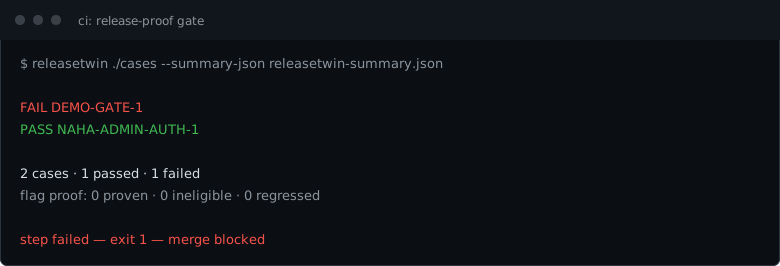
A change opens a PR. ReleaseTwin runs your cases in your own runner and reports back. Here it catches a regression, blocks the merge, then goes green on the fix — real output from a real run.

It's a real merge gate — a failing check you make required, the same as unit tests.
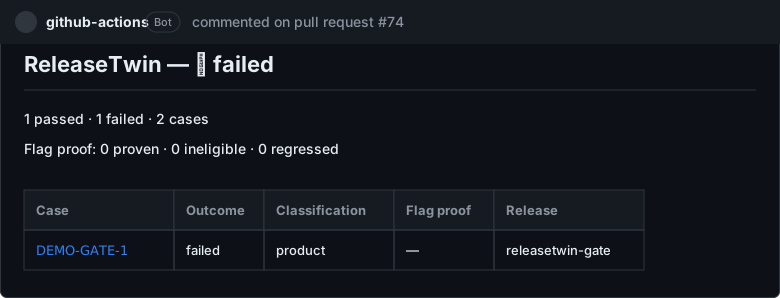
The verdict is readable — totals, flag-proof, and the notable cases, updated in place on every run.

Push the fix and the same check goes green — the comment updates in place, no new noise.
The verdict isn't GitHub-specific
pipelines:
  pull-requests:
    '**':
      - step:
          name: Release-proof gate
          services: [docker]
          script:
            - >
              docker run --rm -v "$BITBUCKET_CLONE_DIR/cases:/workspace:ro" -v "$BITBUCKET_CLONE_DIR:/out"
              ghcr.io/ernestoalejowitt22/releasetwin/cli:0.4.0 run /workspace --summary-json /out/releasetwin-summary.json
          artifacts:
            - releasetwin-summary.json
The deliverable is a CI-agnostic --summary-json contract, not a GitHub integration. On Bitbucket Pipelines the gate is one step and a non-zero exit blocks the merge — same verdict, no packaged Bitbucket app required. Verified live, not just typed: releasetwin-ci-examples runs real demo apps through a real Bitbucket Pipeline on every push. More in the CI docs.
Connect the hosted dashboard and each run's history and redacted evidence lands there too — only metadata leaves your infra.
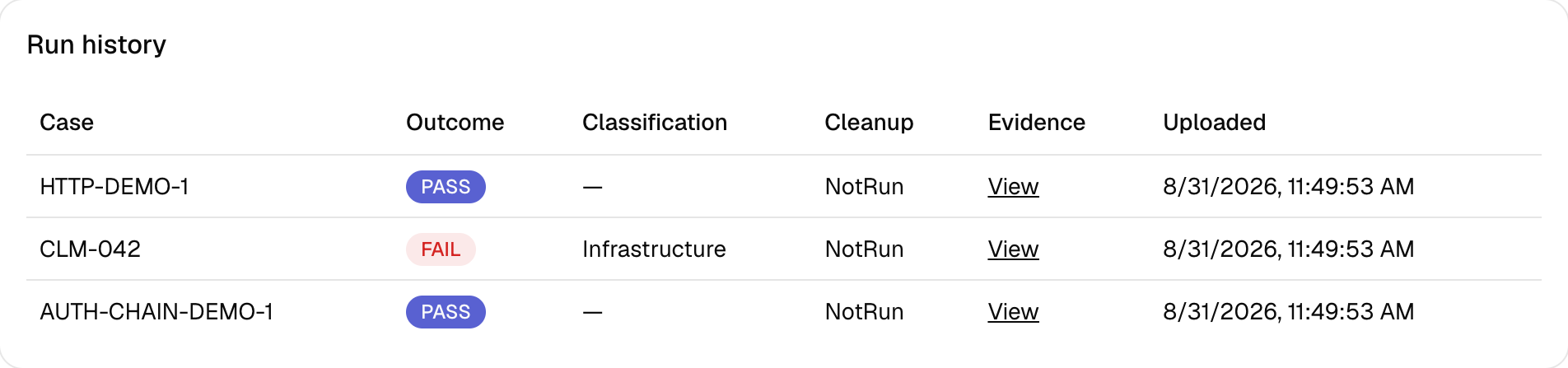
Every run's history lands on the dashboard — pass/fail, your classification, and a link to the evidence.
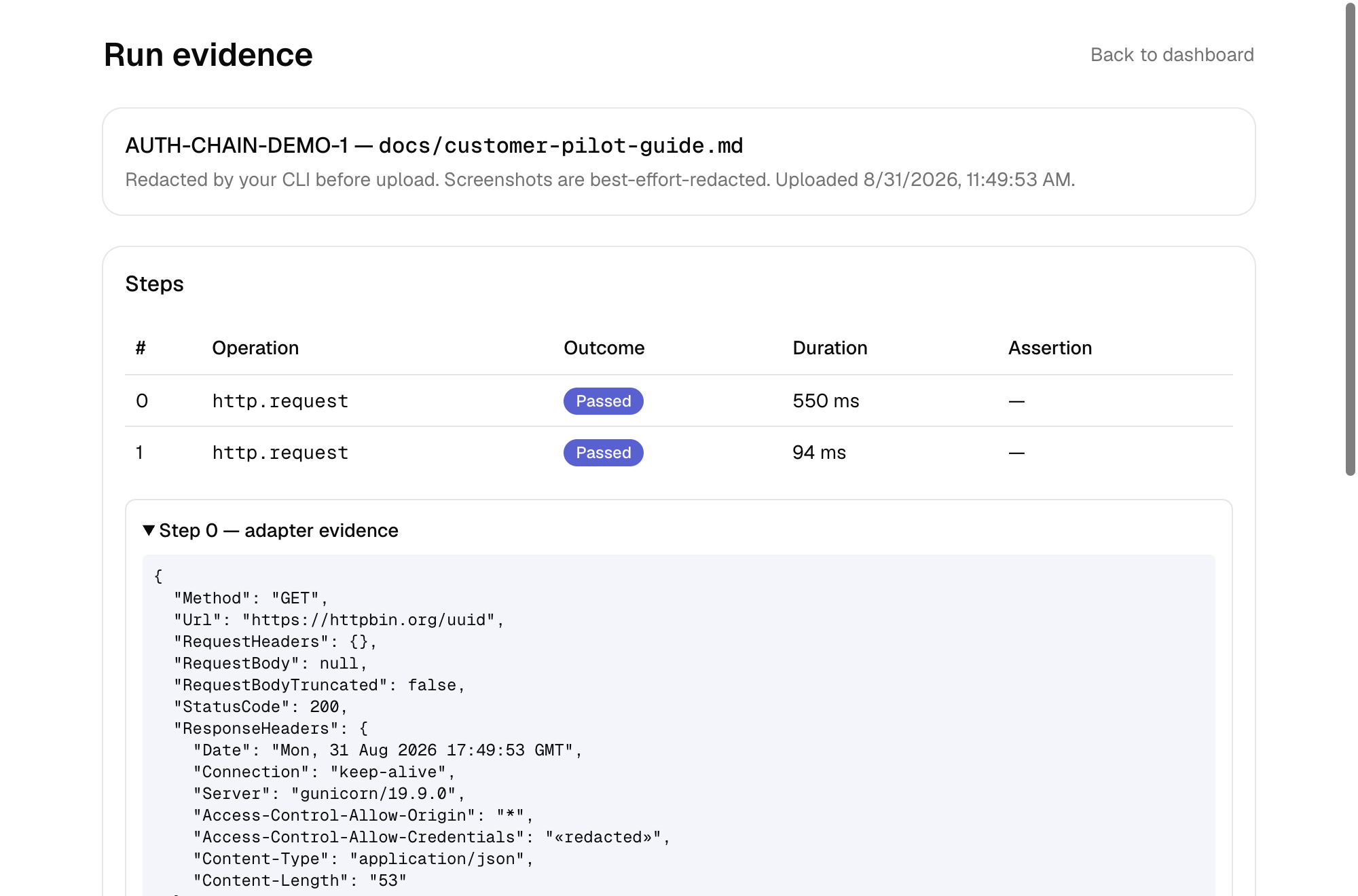
Open a run and you get the request/response of every step — with credential-shaped fields stripped in your CLI before anything is uploaded.
Your data stays put
Built for integration-heavy teams who can't send their test data to a vendor. Nothing here asks you to.
Execution stays in your infra
The CLI runs on your machine or in your CI, and the hosted platform stores what it reports. Hosted evidence runners — a pinned journey on ReleaseTwin-operated compute — are planned, not yet available on any tier.
Only metadata leaves, by default
Case ID, oracle reference, fixture hash, pass/fail, classification. Never fixture content, response bodies, or credentials — the ingest contract has no field for them. We're independent and self-funded, so our incentive is your renewal, not your data.
Redaction runs in your CLI
Evidence upload is opt-in and per-project. Auth headers, credential-shaped fields, and resolved secrets are stripped before the socket opens — in code you can read.
What the hosted dashboard adds
On top of the open-source engine. See the full features list for every capability and its tier.
Evidence viewer
Per-step request/response summaries, assertion detail, and UI screenshots — redacted in your CLI before upload.
Hosted project secrets
Store credentials once per project; the CLI fetches them wherever it runs, instead of per-runner env vars.
Trend analytics
Pass/fail and flake trends across a project's run history.
Custom redaction rules
Your own allow/deny rules layered on top of the built-in credential redaction.
Linear write-back
Connect Linear once; every run posts pass/fail evidence back to the ticket it proves, and mentioning the agent on a ticket requests a re-verification.
Try it against your own API
The HTTP example needs no credentials. Run it, then point a case at your own endpoint. Connect the dashboard when you want run history.
No account needed to look: a real case file or the quickstart from an empty directory.